java.com

 
文章: 158
 |
 于 2007-11-18 16:05 于 2007-11-18 16:05   
This was also what I were looking for firmware 1.1.1 and without summerboard and/or customerize.
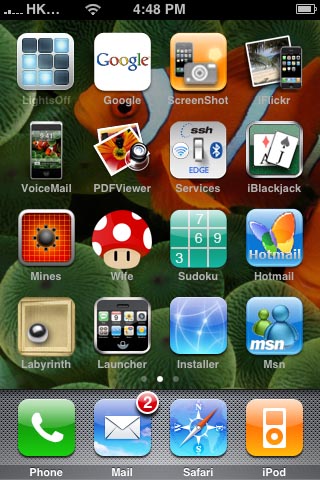
And here is one of the tricks that will do if you have more than one page in the original springboard.
You need to do ssh copy and a little bit of image edit stuffs.
This method will let you have different background image for each page (but don't try it on the first page, it may not work)
Moreover, if you add applications very often, this method is very time consuming.
(1) find out the top left application in your second page (in my case this is LightsOff)
(2) find a nice background that you like and make it into 600 x 650 (you may use crop tool in photoshop) with 72 dpi (you have to change the opacity say 60% in order to dim the wall paper color a bit)
(3) copy the original icon (in my case LightsOff.app/icon.png) and back it up
(4) paste the LightsOff.app/icon.png into the center of your wallpaper (created in step 2), for photoshop, if you copy and paste using keyboard command, it will paste it right in the center already.
(5) save the wallpaper in png format as icon.png
(6) replace the LightsOff.app/icon.png (for my case) with the newly created icon.png (in step 5) and restart your iPhone
(7) Of course, if you add application later on and all your icons would rearrange, then your background wallpaper will ruin your screen, therefore you should always backup your original icon.
Here is my screen dump
----------------------------------
|
java.com 修改于 2007-11-18 23:54
|



 ◇ 哎.瘋.人.網 ◇
  顯示適合列印的版本
  寄給朋友
寄給朋友


